

July 2026
UPCOMING EVENTS32nd Annual User Group ConferencesWe will be hosting our 32nd Annual User Group Conferences in Leavenworth, WA and Seaside, CA. Tuesday and Wednesday will be full days, and there will be a morning session on Thursday.
2026 Pricing: Leavenworth, WA: October 6th – 8th Register for WASeaside, CA: October 20th – 22nd Register for CA |
Reach out to support@cascadegovsoftware.com with any questions or if you have a request for a specific agenda topic. We hope to see many of you in October! |
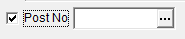
DID YOU KNOW?Have you ever created a record in WinCAMS, only to find that it appears to vanish? It may have landed outside your directory filters! In the Directory, you can choose how to handle records that fall outside your search filters. Use the checkboxes next to your filters to either turn off the filters or show a warning message. |
![]() |
Want to filter to only show records that do NOT have value (such as a post batch number)? You can also filter the Directory on an empty field to narrow records to those without selected data. |
![]() |
NEW FEATURESMany users of A/R Invoices bill for multiple divisions or departments. Billing Addresses allows you to save information for these departments including remit addresses, logos, and notes for preparers and payment terms. From the A/R Invoice Forms report, you can pull an issuing department’s information onto the invoices being created. A new button in the notes area allows you to save batch notes to the Billing Address being used right from the form, so you don’t have to go into the master to make edits. |
![]() |
Have you ever struggled to install WinCAMS patches because users are still in the system? You can now see which users are active by going to System > Settings > Users from the File menu and selecting the Idle Settings tab. The Idle Settings also allow you to force logoffs for all users at a selected time and date, or to set a timeout window to logoff users after a specified period of no activity. |
![]() |
In other User news, WinCAMS now supports Single Sign-On, so you don’t have to keep typing your username and password every time you start up. You’re already logged into your PC – we can use your Windows credentials to log you into WinCAMS and streamline your experience. Click the “Set Up SSO” button from your login screen to set it up or contact us if you don’t see the option and would like to activate it. |
MODULE SPOTLIGHT
Motorpool
Motorpool is an add on to the Vehicle and Equipment Module that allows WinCAMS users to track and bill Motorpool Vehicle usage.
- Vehicle reservation scheduling program
- Flexible options for rate setting include flate rates, usage by mile or hour, usage by day, or a mixture.
- Rates can be set by individual vehicle or category.
- Minimum and estimated charges are handled as well.
- Vehicles can be assigned to a responsible Agency or be available for rental from a Pool.
- Internal Billing integration with Journals and AR.
Already using Motorpool? Let us know if you’d like a deeper dive.
Interested in adding it to your suite? Contact us for a demo and more information.
Do you want to be a Beta Tester for WinCAMS 5.0?
Contact us at support@cascadegovsoftware.com to be first in line to test the new version.


.png?width=1120&upscale=true&name=download%20(1).png)
.png?width=520&upscale=true&name=download%20(2).png)