
 |
UPCOMING EVENTS32nd Annual User Group ConferencesWe are excited to see you at our 32nd Annual User Group Conferences this month! If you are already registered and want to request a discussion topic be added to the agenda, let us know at support@cascadegovsoftware.com.
If you aren’t yet registered, event links are below for any last minute sign-ups: |


|
DID YOU KNOW?
Locking Checkboxes Some records – leave adjustments, service requests, receipts, and repair orders – are not “posted” like most records as part of their lifecycle. Instead, they can be “locked” with the padlock icon to prevent future edits. If needed, an admin can unlock them. |
 |
Collect All Fiscal Years On the Invoices tab of a Vendor record, this checkbox allows you to populate the grid with invoices from all fiscal years, to view previous years alongside the current FY.
|
 |
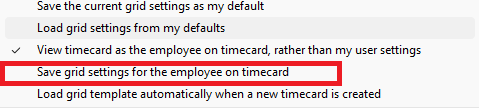
Timekeeper Settings When a timekeeper is viewing another employee’s timecard with “view timecard as the employee on timecard” selected, they can modify grid settings and then save them for the employee whose timecard they are working in. This can be useful to help other employees set up their timecard grid for a better time entry experience. |
 |
NEW FEATURESSlip Tank FuelMany users fill up a truck and then a slip or aux tank on the back of the truck. These should be handled differently to avoid duplicating fuel usage (and charges) – the truck is consuming fuel, so that should be fuel usage. The slip tank is simply an inventory transfer from the larger tank to the slip tank. WinCAMS Cardlock import can handle this with the following steps: 1. Create a vehicle category for the slip tanks and check the box to set fuel transactions as inventory transfers. |
 |
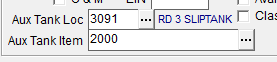
2. Create the slip tanks as “vehicles” in the vehicle master. Selecting the vehicle category with the above checkbox marked will open cells in the main tab allowing you to associate the slip tank with a new inventory location and item. |
 |
3. Give the slip tanks their own cards and use them in a separate transaction from fueling the truck. 4. Now your cardlock will recognize the slip tank, and create an inventory transfer rather than fuel usage. 5. Then there is often a log sheet for fuel-ups coming out of the slip tank. These may be entered manually in Fuel Data Entry, or even better, we can help set up an excel “cardlock” import for your slip tank fuel! |
MODULE SPOTLIGHT
EngineeringThe Engineering module carries a capital project from first estimate all the way through to final payment. It allows for building and tracking:
Already using Engineering? Let us know if you’d like a deeper dive.
Interested in adding it to your suite? Contact us for a demo and more information. |
 |
Do you want to be a Beta Tester for WinCAMS 5.0? Contact us at support@cascadegovsoftware.com to be first in line to test the new version. |
